
The Ultimate Recipe Site & Food Blog Directory
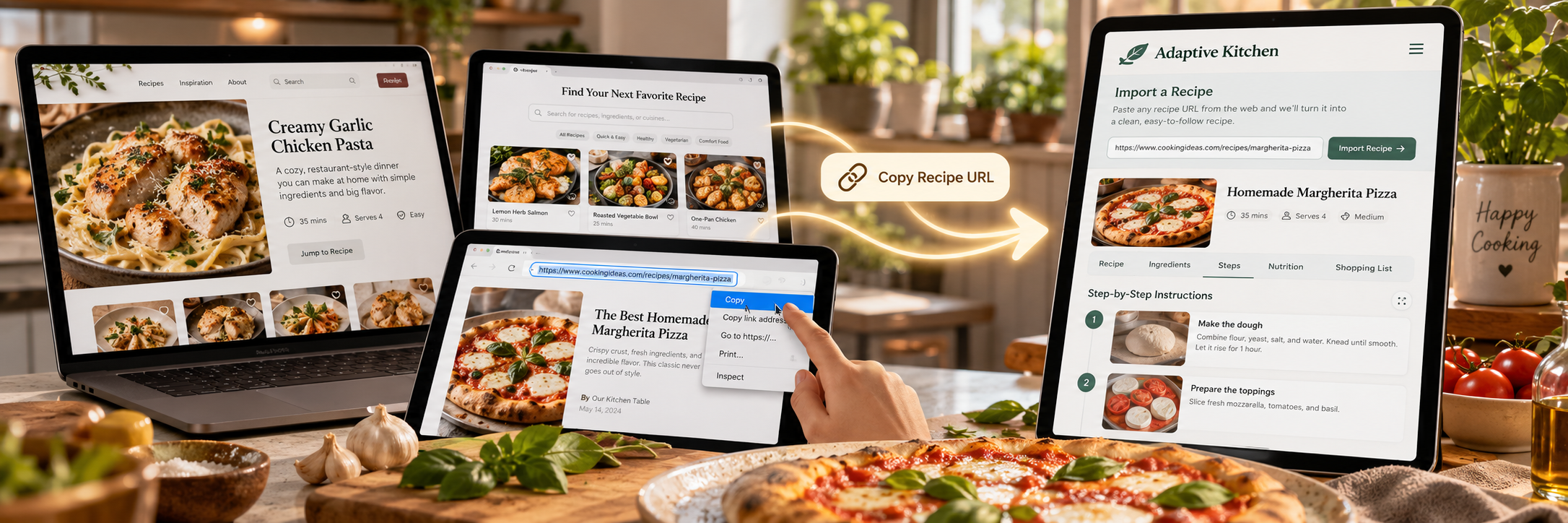
Find Your Next Meal to Import & Adapt
While Adaptive Kitchen allows you to search and manage recipes directly within your personal digital recipe box, you can also explore external food blogs and recipe websites for inspiration. When you find a recipe you love on any of these sites, simply copy its web address (URL) and paste it into Adaptive Kitchen to preview a supported recipe before saving it. You can keep it close to the original or use Recipe Studio to discuss how to reimagine it around your preferences.
1. Powerhouses: Major Recipe Platforms & Culinary Networks
Major Media & Networks
Technique & Culinary Science
Everyday & Budget Cooking
2. Celebrity Chefs & TV Personalities
3. Cuisine-Specific Food Blogs
4. Low-Fatigue & Adaptive Cooking Resources
5. Specialized Equipment & Method Blogs
6. Dietary & Lifestyle Specialists
7. Specialty, Baking & Meal Ideas
Top Creator & General Blogs
Desserts, Baking & Breads
Meal Slots: Breakfast, Soups & Appetizers

Embrace the Taste: Cooking with Disability
21 Books. 21 Culinary Adventures.
Explore David York’s 21-book cookbook collection, created around accessible cooking, practical techniques, and recipes designed with disability in mind.
Active Adaptive Kitchen subscribers can receive one complimentary Kindle book from the collection for each paid monthly billing cycle, subject to the subscriber benefit terms.
Explore the Embrace the Taste Collection →Bring Great Recipes Into Your Kitchen
Explore the sites above for inspiration, copy the URL of a recipe you love, and bring it into Adaptive Kitchen to save, organize, and adapt it to the way you cook.
Found a recipe? Bring it home.
Start with the recipe’s own page, rather than the site’s home page or search results, and try its URL in Recipe Portal. Review the captured ingredients, directions and available details before saving.
If a website blocks the direct import, try Paste Page Source on Windows in Chrome or Edge: open the recipe page, press Ctrl+U, then Ctrl+A and Ctrl+C. Back in Recipe Portal, choose Paste Page Source, click in its box, press Ctrl+V, then choose Extract Recipe. The green Chef hat beside that option opens illustrated help.
On a phone, use Paste Recipe Text or Photo Capture. Pasted text does not bring the original photos. Source restrictions can limit any import, so review the preview before keeping it.